
Buying a laptop can be confusing with so many brands, models, and technical specs out there. If you’re someone who just wants a laptop that works perfectly for your needs without getting lost in jargon, this laptop buying guide simple is made just for you.
By the end of this guide, you’ll know exactly what to look for and how to pick a laptop that suits your lifestyle.
1. Identify Your Purpose

The first step in buying a laptop is understanding what you’ll use it for. Different tasks require different levels of performance. Ask yourself these questions:
- Are you a student or professional? You might only need it for Word, Excel, online classes, or Zoom calls.
- Do you plan to game? Gaming laptops need powerful processors, strong graphics cards, and fast refresh-rate displays.
- Are you a content creator? Photo editing, video editing, 3D design, and animation need high-end CPUs, GPUs, and lots of RAM.
- Is portability important? Travelers and commuters will benefit from lighter laptops with long battery life.
Knowing your purpose saves money and prevents you from buying overpowered laptops you don’t need.
2. Choose the Right Processor (CPU)
The CPU is the brain of your laptop. It determines how fast your laptop performs tasks. Here’s a breakdown:
- Intel Core i3 / AMD Ryzen 3: Ideal for basic tasks like browsing, emails, and document editing.
- Intel Core i5 / AMD Ryzen 5: Perfect for multitasking, light gaming, and moderate work tasks.
- Intel Core i7 / i9 or AMD Ryzen 7 / 9: Best for heavy gaming, video editing, and professional creative work.
Tip: Most everyday users will find i5 or Ryzen 5 laptops a perfect balance between price and performance.
3. RAM: How Much Do You Really Need?
RAM allows your laptop to run multiple programs simultaneously. Here’s what to consider:
- 8GB RAM: Enough for students, office work, and casual use.
- 16GB RAM: Great for multitasking, gaming, and creative work.
- 32GB or more: Needed for professional video editing, 3D rendering, and high-end gaming.
Always aim for at least 8GB RAM, as less can make your laptop slow and frustrating.
4. Storage: SSD vs HDD
Storage affects how much you can save on your laptop and how fast it runs.
- HDD (Hard Disk Drive): Cheaper, large storage, but slower. Suitable if you store tons of files but don’t need speed.
- SSD (Solid State Drive): Faster, reliable, and boosts performance. 256GB SSD is a good starting point; 512GB or 1TB is better if you save games, videos, or large files.
Tip: If possible, choose a laptop with an SSD; it makes your laptop feel significantly faster.
5. Graphics Card (GPU)
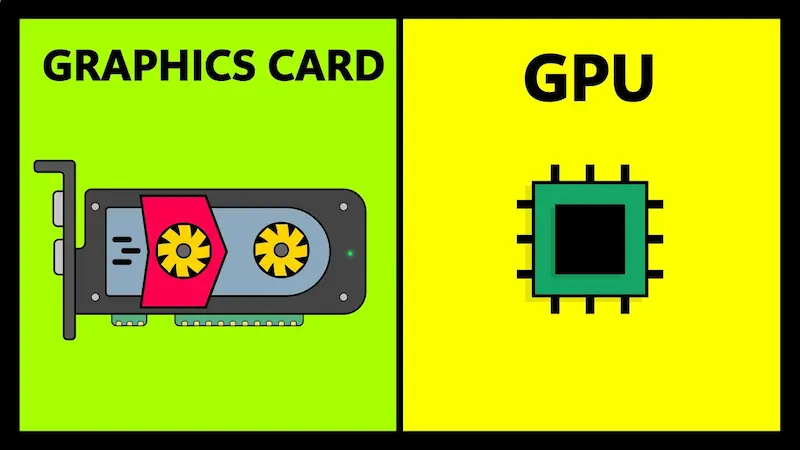
Most laptops come with either integrated or dedicated graphics.
- Integrated Graphics: Built into the CPU; good for basic tasks, movies, and web browsing.
- Dedicated Graphics (NVIDIA/AMD): Needed for gaming, video editing, and 3D design.
For casual users, integrated graphics are enough. Gamers or content creators should consider laptops with a dedicated GPU like NVIDIA GeForce GTX/RTX series.
6. Display and Screen Size
Your laptop display affects comfort and usability:
- 13–14 inches: Compact, lightweight, and easy to carry. Perfect for students and travelers.
- 15–16 inches: Balanced option for work, gaming, and everyday use.
- 17 inches: Large and immersive, but heavy; best for gaming or editing.
Resolution:
- Full HD (1920×1080): Standard, clear, and sufficient for most users.
- 4K (3840×2160): Best for high-end video editing and media consumption.
Tip: Look for IPS panels for better colors and viewing angles.
You may also like to read this:
High Performance Gaming PC – Ultimate 2026 Guide
Gaming PC Setup Guide: From Components To Full Assembly
Custom Gaming PC Tips: Build Your Perfect Gaming Rig
Latest Gaming PC Trends 2025: Hardware, AI & VR Insights
Best Laptops For Students 2026 – Expert Recommendations
7. Battery Life
Battery life is crucial if you move around a lot:
- Ultrabooks: 8–12 hours
- Mid-range laptops: 6–8 hours
- Gaming laptops: 3–5 hours
Always check real-world battery reviews rather than relying solely on manufacturer claims.
8. Operating System (OS)
Your choice of OS depends on your comfort and work requirements:
- Windows: Most versatile and compatible with nearly all software.
- MacOS: Ideal for creative work and Apple ecosystem users.
- ChromeOS: Lightweight, fast, and secure; great for students and web-based work.
- Linux: Excellent for developers and technical users, but has a learning curve.
Tip: Stick with an OS you are familiar with unless you’re ready to adapt.
9. Build Quality, Keyboard & Ports
- Build Quality: Metal laptops are sturdy, plastic laptops are lightweight but less durable.
- Keyboard & Trackpad: Comfortable typing and smooth touchpads matter for long hours of work.
- Ports: USB-C, HDMI, SD card slots, and headphone jacks improve connectivity.
Consider what you need for daily use and make sure your laptop has it.
10. Budget: How Much Should You Spend?
Laptops are available in all price ranges:
- Budget: $300–$600 – Basic tasks, browsing, and school work.
- Mid-range: $600–$1000 – Great for work, light gaming, and multitasking.
- High-end: $1000+ – Gaming, professional editing, and creative work.
Tip: Focus on value for money and specifications, not just brand.
11. Additional Tips Before Buying
- Read reviews: Check both professional and user reviews online.
- Test it in-store: If possible, type on the keyboard and check the display.
- Warranty: Ensure at least 1-year warranty and good after-sales support.
- Don’t overspend: Avoid paying for features you won’t use.
Conclusion
Choosing a laptop doesn’t have to be stressful. By following this laptop buying guide simple, you can make a confident decision based on your needs, budget, and preferences. Focus on what matters—processor, RAM, storage, battery, and portability—and you’ll have a laptop that serves you well for years.
FAQs: Laptop Buying Guide Simple
1. What is the most important thing to consider when buying a laptop?
The most important factors are your purpose, processor (CPU), RAM, storage, and battery life. Understanding what you’ll use the laptop for helps you choose the right specifications without overspending.
2. How much RAM do I really need?
8GB RAM: Ideal for students and casual users.
16GB RAM: Perfect for multitasking, gaming, and content creation.
32GB+ RAM: Needed for professional video editing, 3D rendering, and high-end gaming.
3. Should I choose SSD or HDD storage?
SSD (Solid State Drive) is faster, more reliable, and improves overall performance. HDD (Hard Disk Drive) is cheaper and offers more storage but is slower. If possible, always go for SSD.
4. Do I need a dedicated graphics card?
Only if you plan to game, edit videos, or do 3D work. For basic tasks like browsing, office work, and streaming, integrated graphics are sufficient.
5. What laptop size should I buy?
13–14 inches: Portable, best for students and travelers.
15–16 inches: Balanced option for work, gaming, and everyday use.
17 inches: Large display, ideal for gaming or editing, less portable.